반응형

API 8

[kafka] kafka-connect Rest API 호출하기

kafka-connect 의 서버 주소: localhost:8083 [GET] /connectors : 커넥터 목록 조회 [GET] /connectors/{connector_name} : 특정 커넥터의 이름으로 상세 조회 [GET] /connectors/{connector_name}/status : 커넥터의 상태 조회 [GET] /connector-plugins : 카프카 커넥터 내부에 설치된 플러그인 조회 [POST] /connectors : 커넥터 생성 (Body에 JSON 형식으로 데이터 입력) { "name": "my-source-connect", "config": { "connector.class": "io.confluent.connect.jdbc.JdbcSourceConnector", "con..
kafka 2023.11.09

[Spring] RestTemplate 사용법

1. 애플리케이션 클래스에 RestTemplate을 Bean으로 등록 @SpringBootApplication @EnableDiscoveryClient public class UserServiceApplication { public static void main(String[] args) { SpringApplication.run(UserServiceApplication.class, args); } ... @Bean @LoadBalanced public RestTemplate getRestTemplate() { return new RestTemplate(); } } 2. exchange() 메서드로 요청하기 public UserDto getUserByUserId(String userId) { ... /*..

스프링 2023.10.10

[Spring] 스프링 시큐리티 로그인 구현하기(spring boot 3.x.x 버전 - spring security 6.x)

스프링 버전 3.1.2 스프링 시큐리티 버전 6.1.2 RestController 로그인 구현하기 1. 라이브러리 추가 dependencies { ... // spring security implementation 'org.springframework.boot:spring-boot-starter-security' // jwt token implementation group: 'io.jsonwebtoken', name: 'jjwt-api', version: '0.11.5' runtimeOnly group: 'io.jsonwebtoken', name: 'jjwt-impl', version: '0.11.5' runtimeOnly group: 'io.jsonwebtoken', name: 'jjwt-jackson..

스프링 2023.08.21

[Postman] Runner 로 엑셀 데이터 API 호출하기

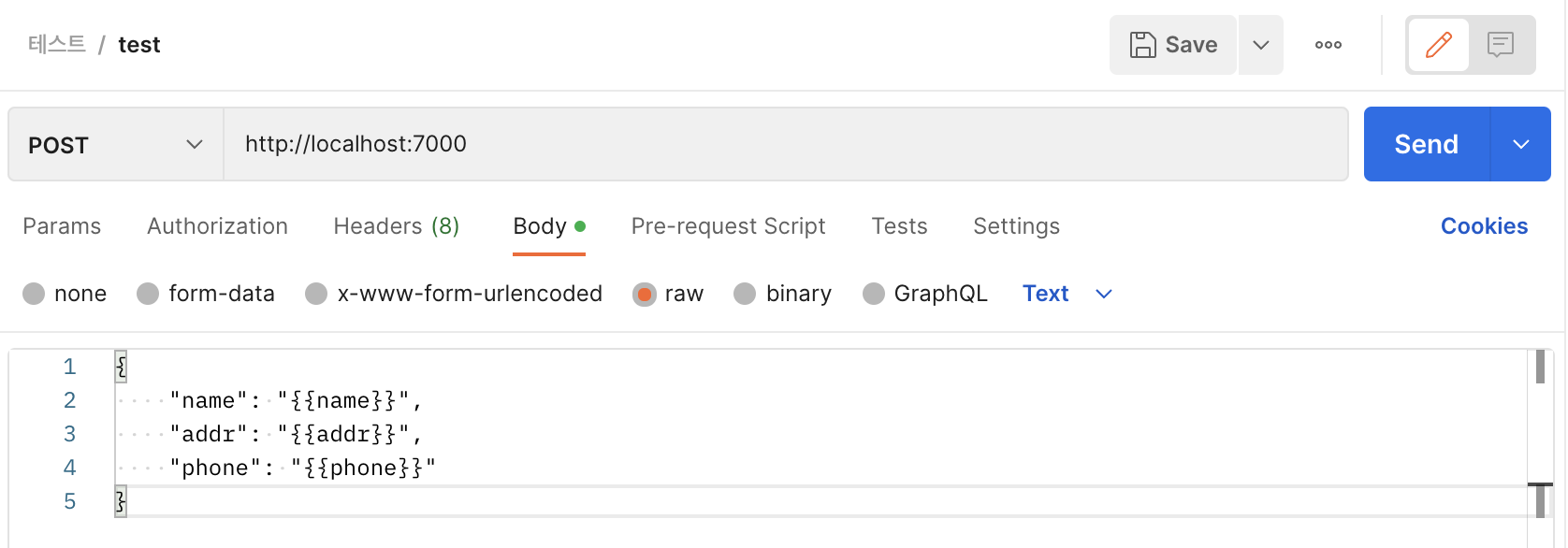
1. Postman 에서 Request 만들기 이때 저 파라미터 {{}} 와 엑셀의 필드 값을 동일하게 맞춰줘야한다. 2. Postman 에서 Runner 만들기 Select File 로 엑셀 파일을 선택하면, Iterations 에 반복될 행의 숫자가 자동으로 들어간다 (수동으로 돌리고 싶은 건 수 입력해도됨) Delay에 시간을 입력하면 텀을 두고 요청함 Start Run 누르면 호출 시작

카테고리 없음 2023.01.06

[Spring] Spring Cloud Gateway 사용법

1. dependency 추가 org.springframework.cloud spring-cloud-starter-gateway 2-1. application.yml 파일에 route 정보 설정 server: port: 8000 spring: application: name: apigateway-service cloud: gateway: routes: - id: {route의 고유 식별자}// first-service uri: {해당 route의 주소} // http://localhost:8081/ (이동될 주소) predicates:// 해당 라우터의 조건 (사용자가 입력한 주소) (/first-service/**로 들어오는 요청은 모두 first-service route로 보낸다. - Path=/fi..

스프링 2023.01.01

[Spring] ResponseEntity 에 대하여

ResponseEntity란 간단하게 말하면, ResponseEntity를 사용하여 컨트롤러에서 Http 요청에 대한 응답 상태코드를 원하는 상태코드로 보낼 수 있다. 1. 원하는 Status 전달 사용방법 @PostMapping("/users") public ResponseEntity createUser(@RequestBody User user){ User savedUser = userDaoService.save(user); return new ResponseEntity(HttpStatus.CREATED);//201 created 상태코드 반환 } postman API 호출 결과(응답) - Status: 201 Created 확인! 2. 원하는 Status + URI 전달 Http 요청에 대하여 사용자..

스프링 2022.10.10

Swagger 라이브러리 사용하기(API 명세서 자동화)

Swagger 란? 프로젝트 내의 API 명세서를 자동으로 만들어 HTML 화면으로 보여주는 라이브러리이다. 설정방법 1. pom.xml 또는 build.gradle 에 라이브러리 추가 io.springfox springfox-swagger2 2.9.2 io.springfox springfox-swagger-ui 2.9.2 // https://mvnrepository.com/artifact/io.springfox/springfox-swagger2 implementation group: 'io.springfox', name: 'springfox-swagger2', version: '2.9.2' // https://mvnrepository.com/artifact/io.springfox/springfox-sw..

스프링 2022.08.18
반응형
